Guide to Using the Interest-Based Meetup Bot
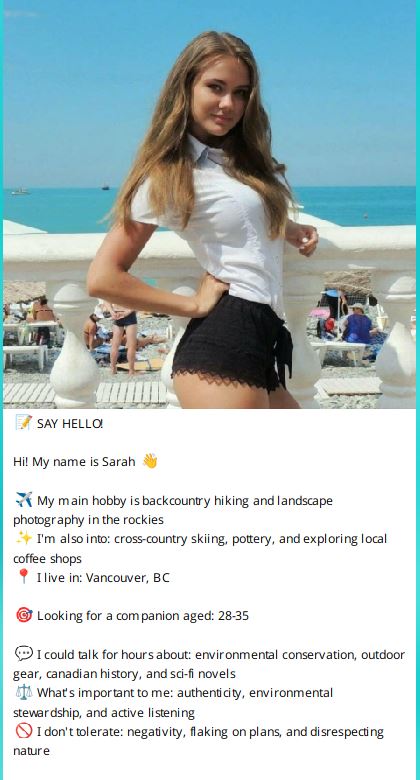
Welcome to our hobby-based meetup service! Our profile questionnaire was created by a professional psychologist and will help you find like-minded people. Fill out the 9-question profile, add a photo — and we will publish it in a private channel.
Advantages of Our Service: ↑
- Confidentiality: We do not collect your personal data.
- Professional Approach: The questionnaire was designed by a professional psychologist.
- Free Placement: During the beta testing period, profile publication is free of charge.
- Secure Storage: All profiles are stored in a private Telegram channel (the channel address may change periodically with prior notice to users).
Important: Our service is not a marriage dating site. We do not focus on gender or age — our goal is to bring people together based on common interests and hobbies.
Within this questionnaire, the term "hobby" is interpreted broadly. This includes not only stable activities in your free time, but also any of your interests: from sports and creativity to research and travel.
Preparation for Filling Out: ↑
- Set up your Telegram profile. Your account must have a @username set. If it is not filled in, do this in Telegram settings, otherwise people will not be able to contact you.
- Prepare your answers. You can think through or write down your answers in advance, so you can later simply copy them into the chat with the bot.
- Editing. During the profile filling process, answers are not finalized immediately. You can return to previous steps at any time and edit them using the "Edit" button.
The bot menu consists of 9 buttons. Below is a detailed description of each field.
Profile Structure: Questions and Recommendations ↑
➡ 1. Name
Bot question: "What should we call you?"
Recommendation: You are not required to provide your legal name. Use the name or nickname that you would be comfortable with others addressing you by.
➡ 2. Hobby #1
Bot question: "What would you be doing if money didn't matter?"
Recommendation: List 1–2 of your most important hobbies that define your personality.
➡ 3. Other Hobbies
Bot question: "What else are you into?"
Recommendation: List your other interests and activities.
➡ 4. Location
Bot question: "Write your city if you don't mind meeting up someday"
Recommendation: Specify your city or region. If you are a fan of remote communication (e.g., online games) and do not plan in-person meetings, you can specify only the region or country.
➡ 5. Age
Bot question: "What age range of conversation partners is comfortable for you (from and to)?"
Recommendation: Specify not your own age, but the preferred age range of your potential conversation partner. Remember that for many hobbies (e.g., online games), the age range can be very broad (from 15 to 85 years old).
The following three questions will help set the framework for comfortable and appropriate communication:
➡ 6. Topics
Bot question: "What topics can you talk about for hours?"
Recommendation: Describe your favorite topics for discussions and communication.
➡ 7. Principles
Bot question: "What is most important to you in principle?"
Recommendation: Specify the life values and beliefs you stand by.
➡ 8. Boundaries
Bot question: "What annoys you?"
Recommendation: Describe what you absolutely do not accept in communication or behavior towards you.
➡ 9. Photo
Instructions: By clicking this button, you will see a summary of your profile. You can either check and correct what you've written, or proceed to sending a photo.
Important: Attach the photo using the paperclip in the chat. Do not check the "Send as file" box and do not add a caption to the image.
Alternative: If you fundamentally do not plan to meet people in real life, you can send any image that is associated with you or your hobby.
Profile Submission. Keep in mind: although you can answer fewer questions, it is better to answer all of them. Complete answers will give a fuller picture of you and help you appear open and attractive. The photo is uploaded last, and immediately after that, the entire profile is sent.
Publication and Moderation Rules: ↑
- Prohibition of Insults: Any offensive texts and photos, including those with sexual connotations, are prohibited. They will be removed unconditionally. The administration reserves the right to take any available measures against individuals who violate the rules.
- Testing Policy: There is no point in sending a "test" profile to check. Any test profile that imposes unnecessary work on the administrator will be deleted from the system. If after this you want to place a real profile, its editing and re-placement at your request will be carried out on a paid basis. Therefore, please fill out the form correctly from the start.
What Happens After Submission? ↑
- After your profile is successfully placed, you will receive a notification from the Administrator.
- This will give you the opportunity to view other participants' profiles in our group.
- Interested users will be able to contact you via your @username.
About Beta Version Status: As of July 2026, the service is operating in beta testing mode. This means that the channel with profiles is permanent, but we continue to track technical errors and collect user feedback to prepare for the full release.
Frequently Asked Questions (FAQ) ↑
➡ When will the beta version end?
The exact release timeline depends on the amount of feedback collected. All users will be notified in advance about the transition to the full version. The terms of profile placement may change, but all profiles placed during the beta version will remain in the channel.
➡ Can I change a profile that has already been submitted?
After publication, the profile goes to a private channel, and editing is only possible through the administrator on a paid basis. Therefore, we recommend carefully checking all fields before submission using the "Edit" button in the dialogue with the bot.
➡ What should I do if I want to delete my profile?
Write to the administrator in the support group @diplom_dissertacia_kursovaya, specifying your @username. We will delete your profile from the channel within 1-2 business days.
➡ Is it safe to provide my data in the bot?
Yes. We do not collect passport data, phone numbers, or other sensitive information. All data is stored in a private Telegram channel, access to which is only available to administrators. You decide what information about yourself to disclose in the profile.
➡ What is the point of storing profiles in a private Telegram channel?
Some hobbies may seem strange, such as simply collecting bottle caps or photographing identical numbers on different houses. Therefore, we do not intend to publicize the authors of the ads and currently consider a private channel to be more appropriate.